01
FIND
Choose the audience, problem and focused workshop opportunity.
Workshop Launch Engine gives you a guided path from a rough idea to a workshop you can build, package, promote and prepare to deliver — while keeping the important decisions in human hands.
One useful idea becomes five. A simple session starts turning into a course. Then AI gives you more outlines, more modules and more possibilities — but not necessarily more clarity.
You can end up collecting ideas, prompts, lessons and bonuses without knowing what the workshop is really supposed to help someone accomplish.
You start with one useful outcome, make the important decisions in sequence, use AI where it helps, and build the supporting assets around a workshop that stays focused.
Your customer is not dropped into a folder and left to figure out what to open first. The system guides them through the decisions behind a focused workshop — from finding the idea to building it, packaging it, promoting it, preparing delivery and deciding what comes next.
Each phase has a job. The buyer moves forward by making and recording the next useful decision instead of collecting more information.
Choose the audience, problem and focused workshop opportunity.
Shape the outcome, structure, teaching flow and useful exercises.
Turn the workshop into a clear product people can understand and use.
Prepare the message and promotional assets around the workshop.
Prepare the practical customer experience and workshop delivery.
Decide how the completed workshop can support the next logical opportunity.
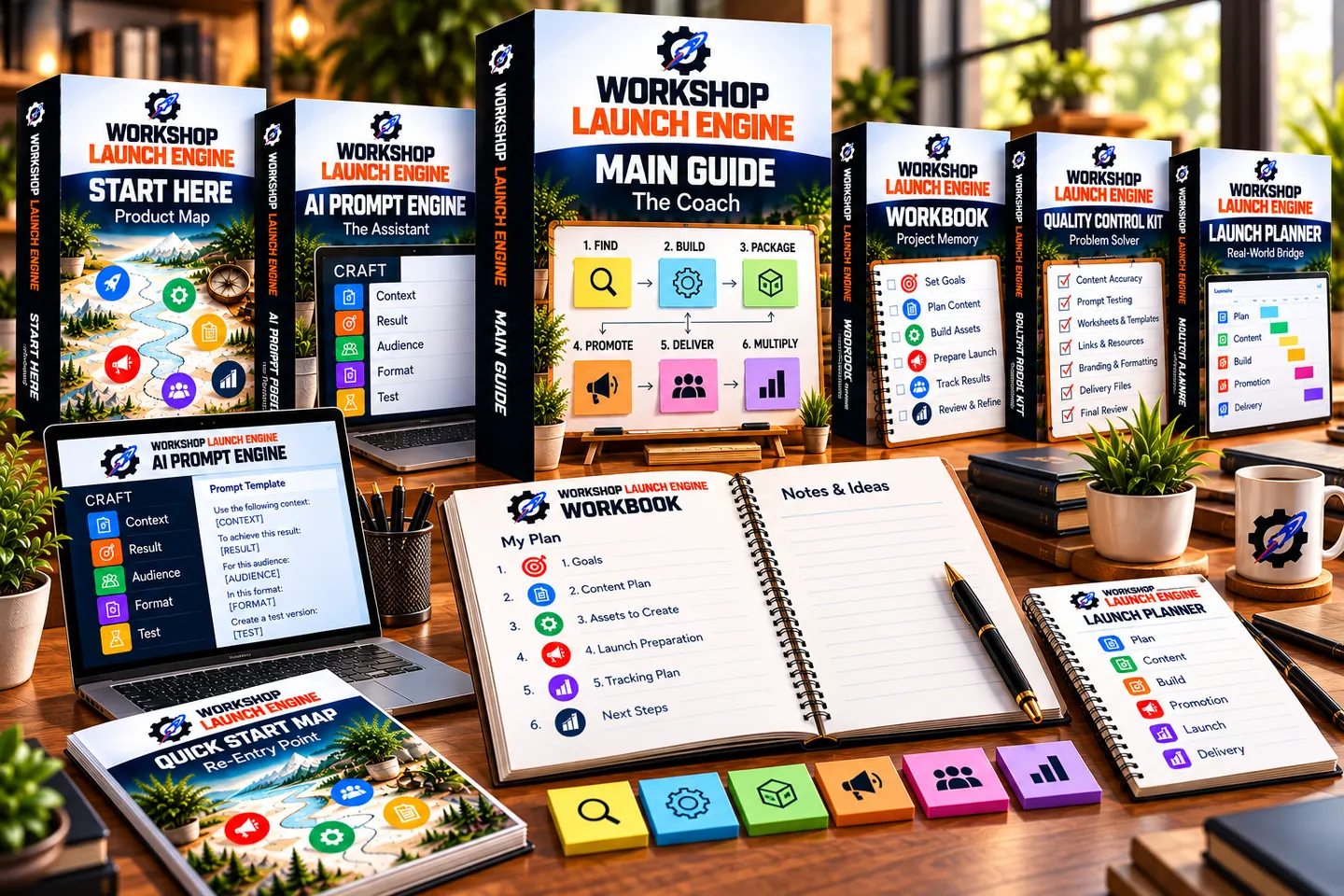
Workshop Launch Engine is not a folder of unrelated PDFs. Each resource has a specific job, so the user knows what to use now — and what to use next.
Your orientation point. See how the package fits together, what each resource does and where to begin.
The teaching layer. Understand the decisions behind each phase and work through the system with context.
The place to capture decisions. Keep the audience, outcome, workshop structure and key choices visible as the project develops.
Structured AI support. Use CRAFT — Context, Result, Audience, Format and Test — while keeping the user responsible for review and approval.
The review layer. Check the workshop and supporting materials for gaps, inconsistencies and areas that need refinement.
Turn the finished workshop into action. Organize practical preparation around promotion, delivery and the real launch window.
Your fast route back into the system. Reorient around FIND → BUILD → PACKAGE → PROMOTE → DELIVER → MULTIPLY whenever you need the big picture again.
Workshop Launch Engine does not depend on one giant prompt that is expected to invent the audience, strategy, curriculum and finished product at once. Instead, the user gives AI a clearer job, reviews what comes back and keeps control of what gets accepted.
A broad request can produce a lot of material, but more output is not the same as a focused workshop. Important assumptions can remain hidden and weak decisions can compound.
Define the task, provide the right context, review the response and refine it before locking the decision into the project.
CRAFT makes the request more deliberate by defining five things before relying on the output.
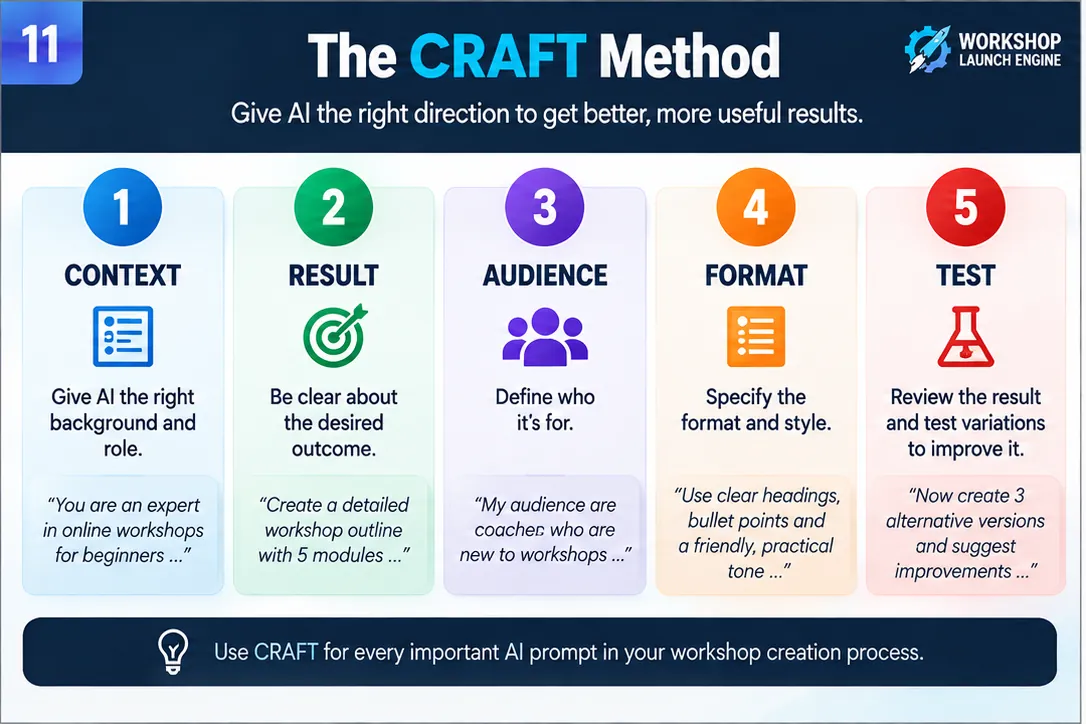
The second layer turns AI assistance into something the user has actually reviewed and chosen.
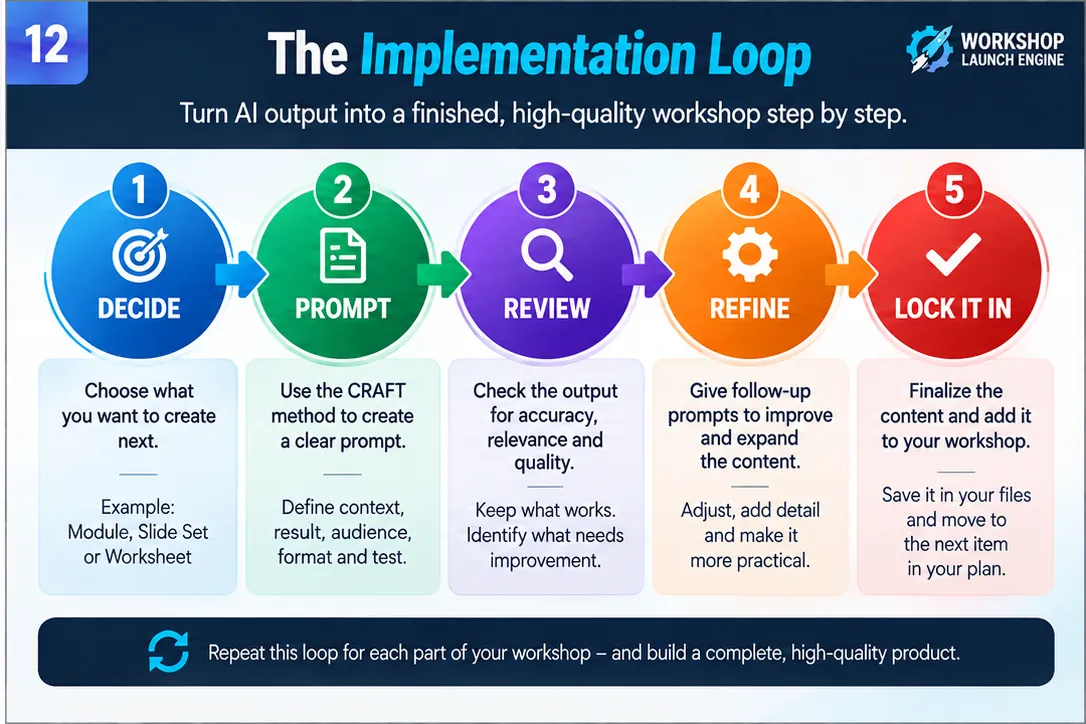
A strong fit for sellers who want a usable product foundation they can shape around their own brand — not a promise of instant results or a license to pass resale rights downstream.
I wanted to avoid creating another White Label package that looks impressive when you open the folder but leaves you wondering what you are actually supposed to do with everything.
So I approached Workshop Launch Engine from the product side first.
The Main Guide, Workbook, AI Prompt Engine, Quality Control Kit, Quick Start Map and Launch Planner each have a different job, but they work as one connected system so the end customer knows where to begin and what to use next.
Then comes the White Label layer: editable masters, customer delivery and seller materials that let you shape the product around your own brand and offer.
Because before it is something you can rebrand and sell, it should be something worth putting your name on.
Mirko van Anken
Digital Marketer · Coach · Product Creator

Everything you have seen so far is the customer product. The White Label layer gives the direct buyer the editable foundation and licensed rights to customize the presentation, shape the offer around their business and sell a finished edition.
A connected workshop-building system with its own customer experience, resources and working method.
Use the editable masters and seller resources within the included license to prepare the edition you want to sell.
You can keep the customer-facing product branded as Workshop Launch Engine and build your offer around it, or take the deeper customization route and create a more distinct edition. The customer-facing version should not be presented as “White Label Edition.”
Your selling and customization rights are governed by the included license. Your end customer receives the finished product for personal use only; no White Label, PLR, MRR or RR rights pass downstream.
The White Label package goes beyond the customer PDFs. You also receive the editable product foundation, a prepared customer-delivery package and essential seller materials so you are not starting from an empty folder when it is time to build your offer.
Work from the included editable DOCX masters when you want to customize content, update branding or prepare a more distinct edition.
A prepared customer-facing package helps you move from editing to delivery without having to reconstruct the product structure from scratch.
The core sales materials are included with the Front End, giving you a practical starting point for presenting and promoting your edition.
The Front End includes its own essential seller sales materials. You can customize those materials around your brand, offer, checkout, support details and customer workflow.
You do not have to rebuild everything before you can use the license. Choose the level of customization that fits your offer.
Keep the underlying product structure, then update the seller identity, visual presentation, offer details, links, checkout and customer support information.
Rename the product, adjust positioning, replace covers and graphics, edit content where useful, update sales assets and rebuild the final customer package around your edition.
Start with a connected customer product, customize the edition you want to sell, and connect it to your own checkout, support and customer workflow.
$27 one-time price · White Label / PLR rights included for the direct buyer
No. The AI Prompt Engine is one supporting tool inside a broader workshop creation system. The Main Guide teaches the process, the Workbook stores approved decisions, the Quality Control Kit helps fix problems, the Launch Planner handles operational readiness, and the START HERE Product Map shows the customer how the pieces work together.
Yes. The direct buyer receives the White Label / PLR rights described in the included license and may customize, rebrand and sell a finished version.
No. Your customers receive Personal Use rights only. White Label, PLR, MRR, RR or other resale rights may not be passed downstream.
No. No sales, traffic, conversion, income or business-growth result is guaranteed.
Your purchase is covered by a 14-day money-back guarantee. If you decide Workshop Launch Engine is not right for you, you can request a refund within 14 days of your purchase.
Get the connected workshop creation system, customize the White Label edition around your brand, and sell a finished product with a clear customer journey already built in.
GET WORKSHOP LAUNCH ENGINE — $27 →